

TL;DR
- Keyword and full-text search tools like SharePoint or Confluence search were designed for document retrieval, not answering complex business questions.
- They return documents — not answers — leaving employees to do the hard work of reading, comparing, and synthesising information manually.
- AI Agentic Search doesn't just find relevant content. It reads the retrieved documents, reasons across them, and constructs a precise, sourced answer — the way a knowledgeable analyst would.
- The difference isn't a better search bar. It's the difference between a file cabinet and a colleague who has read everything and can explain what it means.
The Problem Nobody Talks About
Every enterprise has a search bar. SharePoint has one. Confluence has one. Your document management system almost certainly has one too.
And yet, employees still spend hours every week hunting for information. They type keywords, get a list of twenty documents, open four of them, skim through pages of text, and still aren't sure they found what they needed. Often, they give up and ask a colleague instead.
This isn't a UI problem. It's a fundamental architectural one.
Keyword search was designed to find documents — not to answer questions. And no matter how good your document management system is, no matter how well your folders are organised, if the system can't reason about what's inside those documents, the burden of making sense of them always falls back on the person asking.
In 2026, that's an enormous and unnecessary cost.
How Keyword Search Actually Works
To understand why it fails, it helps to understand what it's actually doing.
Traditional full-text search systems work by building an inverted index — essentially a giant lookup table that maps every word in every document to the files where it appears. When you type a query, the system finds those words in the index and returns documents ranked by how often and prominently those terms appear.
This is fast and effective for one specific use case: finding a document you know exists. It breaks down the moment you need something more:
- You don't know which document contains the answer
- The answer is spread across multiple documents
- You're asking a question that requires reading, comparing, or synthesising — not just matching words
- The relevant information is in a table, chart, or diagram — not plain paragraph text
What keyword search does well:
- Finding a specific policy document by name
- Locating a file you remember uploading last month
- Searching for a contract with a known client name
What keyword search cannot do:
- Tell you what changed between two versions of a regulation
- Summarise all NDAs signed in the past year with penalty clauses over €50,000
- Answer "What did we agree to with Client X regarding service levels in 2022?"
- Cross-reference information from a PDF, a spreadsheet, and a slide deck in a single response
- Search across SharePoint and a database and a shared drive simultaneously — each system has its own search, and none of them talk to each other
The gap between these two lists is where enterprise productivity quietly disappears.
And the obvious workaround — using a general-purpose AI assistant like ChatGPT or Claude — doesn't solve it either. Those tools are powerful, but they have no access to your internal documents, your databases, or your organisation's institutional knowledge. They can reason well, but only about what you paste into the chat window. Your NDAs, your procurement records, your internal policies — none of that exists for them. Every time an employee copies text into a public AI tool to get an answer, they're also accepting a security and compliance risk that most enterprises can't afford.

The Hidden Cost of "Good Enough" Search
Most organisations don't measure the cost of poor search directly. It shows up elsewhere — in hours spent asking colleagues, in decisions made on incomplete information, in compliance risks from overlooked document versions.

In a team of 100 people, that's potentially hundreds of hours per week spent on information friction — before a single line of real work gets done. And this doesn't account for decisions made on the wrong document version, or compliance failures caused by missing a policy update buried in a folder no one thought to check.
Why Semantic Search Alone Isn't Enough
A common upgrade path is to move from keyword search to semantic search — using vector embeddings to match the meaning of a query to the meaning of text passages, rather than just matching exact words.
This is a genuine improvement. Semantic search can find a document about "contractual liability" even if you searched for "who is responsible if something goes wrong." It understands synonyms, related concepts, and contextual meaning.
But semantic search still has a fundamental limitation: it retrieves text, it doesn't understand it.
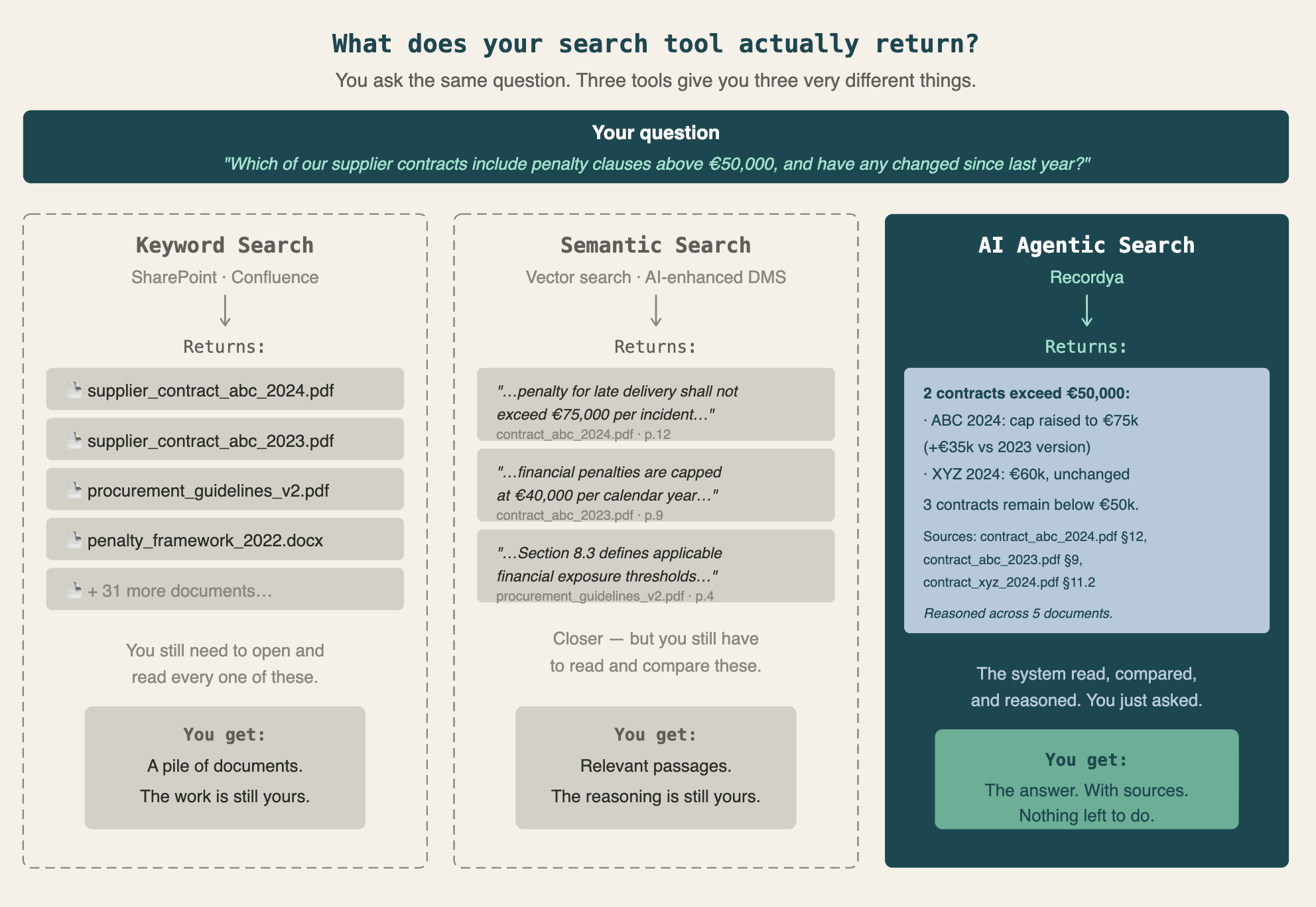
The system finds the most relevant chunks of text and ranks them by similarity to your query. What happens next is still up to you. You read the passages. You compare them. You form a conclusion. The reasoning — the actual intellectual work — is still entirely human.
If you ask "What are the three most common penalty clauses in our supplier contracts, and how have they changed since 2020?", semantic search returns the passages most similar to that question. It doesn't actually answer it.
That requires something different.
The Retrieval-Reasoning Gap — and Why It Matters
Here's the key distinction that most discussions about enterprise AI search gloss over:
Retrieval is finding relevant information. Reasoning is understanding what that information means — in context, in relation to other documents, and in relation to the question being asked.

Every search system, whether keyword or semantic, does retrieval. What almost none of them do is reason.
There's a second, equally important problem that rarely gets named: fragmentation. Enterprise knowledge is spread across fundamentally incompatible systems. SharePoint has its own search. Your database has its own query interface. Your NAS, your CRM, your ERP — each one is a silo. There is no native way to ask a question that spans all of them at once. Employees either know which system to look in (and get a partial answer), or they don't (and get nothing). Searching across sources means opening multiple tools, running separate queries, and manually piecing the results together.
General-purpose AI tools like ChatGPT or Claude don't help here either. They can reason fluently — but only about information you give them. They have no access to your internal documents, your databases, or your organisation's institutional knowledge. Pasting sensitive contract text into a public AI assistant is exactly the kind of workaround that introduces compliance and security risks. And it still only works one document at a time.
What's missing is a system that can reason — and that has secure, unified access to all the sources that matter.
Think about what a skilled analyst actually does when you ask them a complex question. They don't hand you a folder of documents and say "the answer is in here somewhere." They read the documents. They compare them. They identify what's relevant, what conflicts, what's changed over time. They synthesise all of that into a clear, precise answer — and they tell you where they got it.
That's reasoning. Until recently, it wasn't something software could do across a fragmented, multi-source enterprise environment.
AI Agentic Search changes that.
What AI Agentic Search Does Differently
AI Agentic Search is not a better retrieval system. It's a system that retrieves and then reasons — treating the retrieved documents as the raw material for constructing an actual answer, not as the answer itself.
Here's what that looks like in practice:
1. It Reads the Documents, Not Just the Index
When Recordya retrieves relevant content, it doesn't stop there. The system reads the retrieved documents — their surrounding content, not just the short matching passages — and uses that content to construct a response. This means the answer is grounded in what the documents actually say, not just in which documents appeared most relevant.
This is the fundamental difference between a search result and an answer.

2. Query Decomposition: Breaking Down Complex Questions
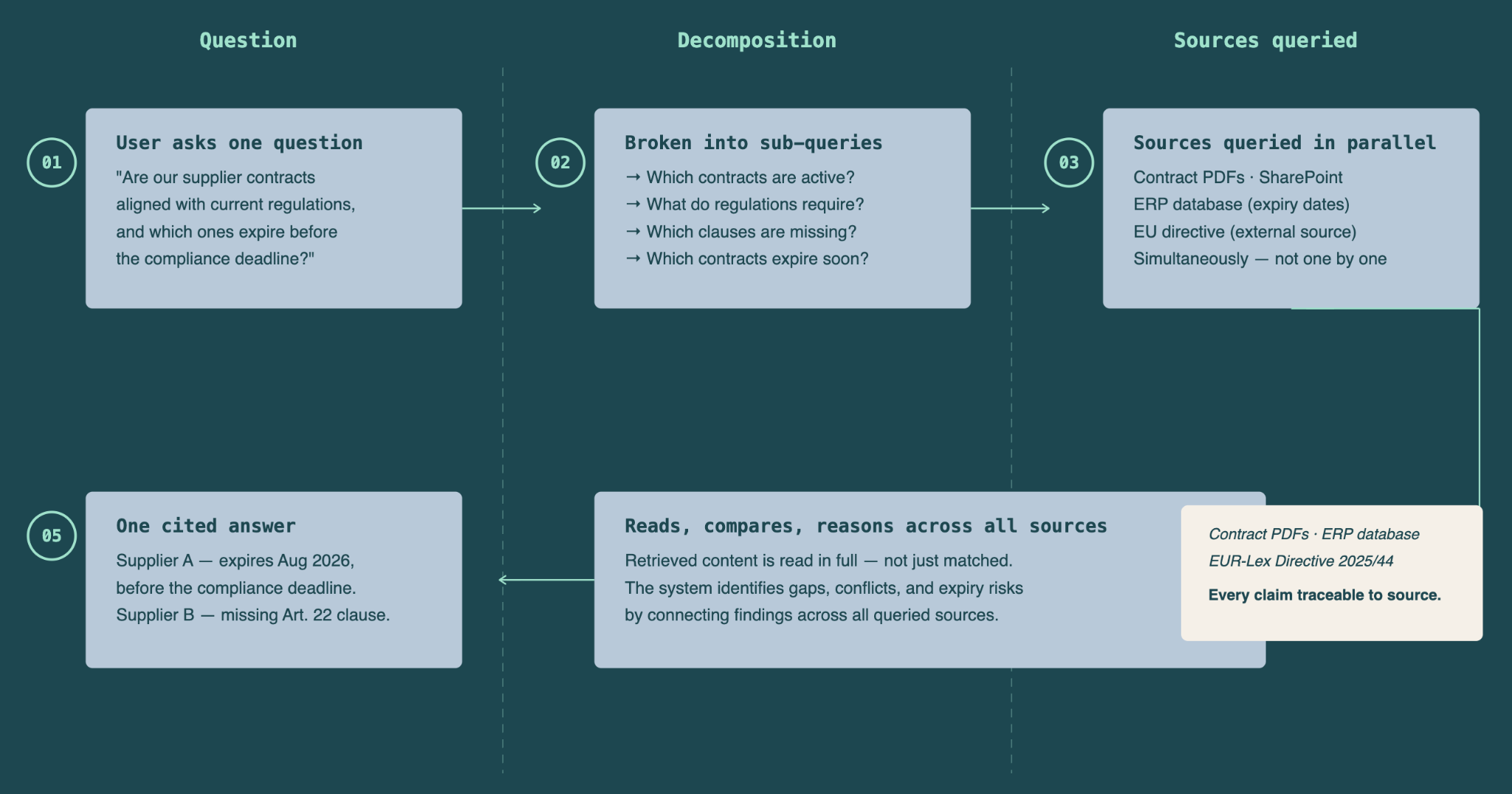
Many business questions are inherently multi-step. "What confidentiality breach clauses have been used in Client ABC's NDAs over the last three years?" isn't a simple lookup — it requires identifying the right client, filtering by document type, considering a date range, and then analysing the content of the clauses themselves.
An agentic system decomposes this automatically into a sequence of coordinated sub-queries, executes them, and synthesises the results. You ask one question. The system does the multi-step work — and then reasons across what it found to give you a coherent, complete answer.
3. Multi-Document Reasoning: Connecting the Dots
Most business questions require connecting information from more than one source. A single contract, a policy update email, a regulatory document, and an internal procedure note might all be relevant to the same question — and the real answer only emerges from reading all of them together.
Agentic search can hold all of that context simultaneously, identify where documents agree, where they conflict, what's missing, and what has changed — and then express that reasoning clearly in its response.
This is what makes it genuinely useful for questions like: "Are our current procurement procedures compliant with the updated EU regulation that came into force in January?" No single document answers that. The system has to read both, compare them, and reason about the gap.
4. Temporal Reasoning: Understanding Change Over Time
Business documents have dates. Regulations get updated. Contracts expire and get renegotiated. Agentic search understands time — it can distinguish between document versions, identify what changed and when, and answer questions that are inherently temporal.
"What was our refund policy in Q3 2023?" or "Which of our supplier contracts predate the new data protection requirements?" are questions that require the system to reason about chronology, not just retrieve the most recent document.

5. Multi-Modal Understanding: Beyond Plain Text
Enterprise knowledge doesn't live only in paragraphs. It lives in tables, diagrams, org charts, scanned forms, and slide decks. AI Agentic Search indexes and reasons across all of these formats — extracting structured data from tables, interpreting diagrams, and integrating information from mixed-format documents into its responses.
A number buried in a spreadsheet column, a liability limit stated in a contract table, a process step shown only in a flowchart — all of it is accessible, and all of it can be incorporated into the system's reasoning.

6. Direct Database Access: Structured Data Is Knowledge Too
Documents are only part of the picture. A significant portion of enterprise knowledge lives not in files but in structured databases — ERP systems, HR platforms, CRM records, financial reporting tools, procurement databases.
Traditional search doesn't touch any of this. It indexes files. What's in your database stays invisible unless someone exports it to a spreadsheet first — and by then it's already out of date.
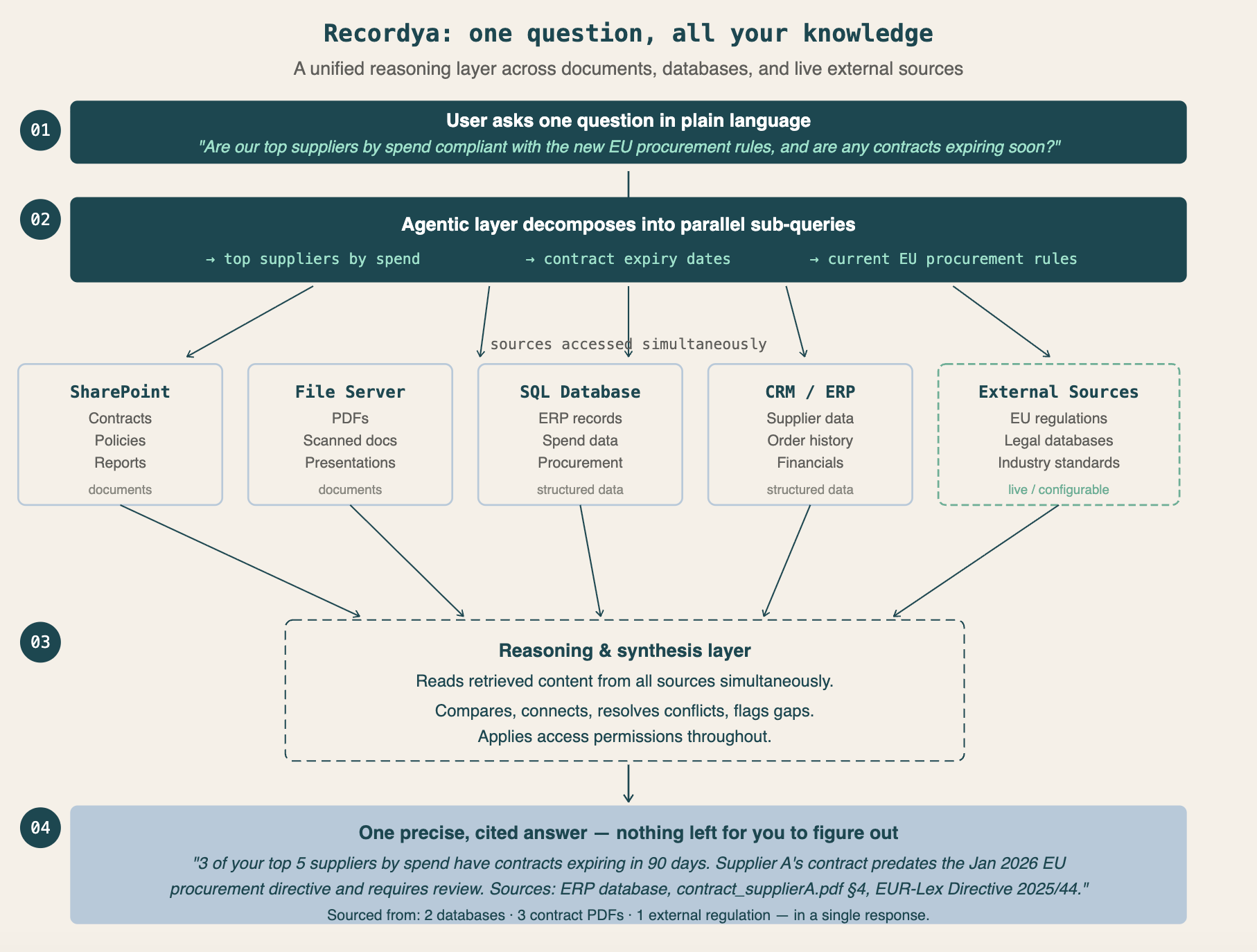
AI Agentic Search can connect directly to SQL databases and query them in real time, as part of the same reasoning process it applies to documents. This means a single question can draw on both structured data and unstructured documents simultaneously — and the system reasons across both.
For example: "Which of our top 20 suppliers by spend have contracts expiring in the next 90 days, and do any of those contracts include auto-renewal clauses?" The answer requires querying the procurement database for spend rankings and contract dates, and reading the contract documents for renewal clause language. An agentic system handles both in one step.
This unified approach — documents and databases, treated as a single knowledge layer — is what turns AI Agentic Search from a document tool into a true enterprise intelligence platform.
7. External Source Access: Always Working With Current Information
Internal documents and databases capture what your organisation knows. But many business questions require knowing what's happening outside — in legislation, regulatory guidance, industry standards, or public procurement frameworks.
Traditional search has no answer to this. It only knows what you've indexed. If a regulation changed last month and your internal policy hasn't been updated yet, the system has no way of knowing that — and no way of flagging the gap.
AI Agentic Search can be configured to connect to external sources as part of its knowledge base. This includes official legal databases, government legislation portals, regulatory authority publications, industry standards repositories, and other curated external feeds. When answering a question, the system can pull from these live sources alongside your internal documents — and reason across both.
This is especially powerful for compliance-heavy industries. A lawyer asking "Is our standard NDA still compliant with the current data protection requirements?" gets an answer that checks the internal NDA template and the latest applicable regulation — not just what was true when the policy was last written.
Some practical examples of what this enables:
- Legal and compliance teams — cross-referencing internal contracts against current legislation, automatically surfacing gaps when a law changes
- Procurement and finance — checking supplier agreements against up-to-date public procurement regulations or sector-specific standards
- HR — validating internal employment policies against the most recent labour law updates in relevant jurisdictions
- Regulated industries — staying current with pharmaceutical guidelines, financial conduct rules, environmental regulations, and more
The result is a system that doesn't just reason well about what it knows — it actively keeps its knowledge current, and tells you when your internal documents are lagging behind the outside world.
8. Source Transparency: Showing Its Work
Every answer Recordya provides comes with citations — links to the exact source documents, pages, and passages used to construct the response. The system doesn't just give you a conclusion; it shows you the reasoning trail.
This matters enormously in enterprise contexts. In regulated industries, decisions need to be auditable. In legal and compliance work, you need to be able to verify every claim. Source transparency isn't a convenience feature — it's what makes AI-generated answers trustworthy and usable.
The Difference in Practice: Real-World Scenarios
Legal and compliance
"What confidentiality breach clauses have been used in Client ABC's NDAs over the last three years?"
Keyword search: Returns 47 NDA documents matching "confidentiality breach." You open them one by one.
Semantic search: Returns the most relevant passages about confidentiality from those NDAs. Still up to you to read and compare.
Recordya: "Three variants of confidentiality breach clauses have been identified across Client ABC's NDAs from 2022–2024. The most recent version (November 2024) includes specific financial penalties and mandatory arbitration proceedings — a significant change from the 2022 template, which specified only general damages. Source documents: NDA_ClientABC_11.2024.pdf, NDA_Template_2024.docx, NDA_ClientABC_03.2022.pdf."
The system retrieved the documents, read them, compared the clause language across versions, identified what changed, and explained why it matters — all in a single response.
HR and policy management
"What is the current equipment allowance for remote workers, and has it changed recently?"
Keyword search: Returns the employee handbook and several policy update emails.
Semantic search: Returns passages about remote work allowances from those documents.
Recordya: "The current remote work equipment allowance is €500 per year, updated in the March 2024 policy revision. This replaced the previous limit of €300 set in the 2022 handbook. The change applies to all employees on permanent contracts; temporary staff remain on the 2022 rate. Source: HR_Policy_Remote_Work_v3.pdf, Policy_Update_March2024.docx."
Finance and procurement
"What payment terms are we working with across our electronics suppliers, and are any of them outliers?"
Keyword search: Returns procurement guidelines and supplier contracts.
Semantic search: Returns passages mentioning payment terms.
Recordya: "Of the 23 active supplier contracts in the electronics category, 17 specify net-30 payment terms. The remaining 6 — including your three largest suppliers by volume — have negotiated net-45 terms. Four contracts include early payment discount clauses (2% for payment within 10 days). One contract with Supplier G has non-standard net-60 terms not matched by any other agreement — this may warrant review. Full breakdown available."
Cross-source: documents + live database data
"Which of our top suppliers by spend have contracts expiring in the next 90 days, and do any include auto-renewal clauses?"
Keyword search: Cannot query the procurement database at all. Returns whatever contract files happen to match the search terms.
Semantic search: Same limitation — no access to live database records, no ability to filter by spend ranking or expiry date dynamically.
Recordya: "Four of your top 20 suppliers by spend have contracts expiring within 90 days: Supplier A (€2.1M annual spend, expires 15 Aug), Supplier B (€1.4M, expires 3 Sep), Supplier C (€980K, expires 28 Aug), Supplier D (€760K, expires 1 Oct). Of these, Supplier A and Supplier C have auto-renewal clauses — both require written notice of non-renewal at least 30 days before expiry. Source: procurement database (spend and dates), Contract_SupplierA_2023.pdf §12.3, Contract_SupplierC_2022.pdf §9.1."
The spend data came from the procurement database. The auto-renewal clause language came from the contract PDFs. The system queried both, reasoned across them, and returned a single, actionable answer.
What to Look for When Evaluating AI Search Solutions
If you're assessing whether to move beyond your current setup, these are the capabilities that separate genuinely agentic systems from marketing-inflated alternatives:
- Reasoning, not just retrieval — does the system actually read and reason across the documents it finds, or does it just return ranked passages and leave the synthesis to you?
- Query decomposition — can it break a complex, multi-part question into coordinated sub-searches automatically?
- Multi-document synthesis — can it hold context from dozens of documents simultaneously and identify connections, conflicts, and changes?
- Temporal awareness — can it reason about document versions, effective dates, and changes over time?
- Multi-modal indexing — does it handle tables, images, and diagrams, not just plain text?
- Database connectivity — can it query your SQL databases directly, not just indexed documents? Can it combine structured database data with unstructured document content in a single answer?
- External source access — can it be configured to pull from live external sources such as legislation databases, regulatory publications, or industry standards — and reason across those alongside your internal content?
- Granular access control — does it respect the same permissions your existing systems enforce, so users only see what they're entitled to see?
- Source citations — does every answer include traceable references, so conclusions can be verified and decisions can be audited?
- Infrastructure integration — can it connect to SharePoint, your NAS, your databases, and other sources where your documents actually live?
- Deployment model — for sensitive documents, can it run on-premise or in a private cloud, keeping your data within your own infrastructure?
A system that retrieves without reasoning is a better search bar. A system that retrieves and reasons is a different tool entirely.
The Bottom Line
Keyword search was built for a world where documents were the end product — where the job was to store and retrieve files. Modern enterprise work is different. The questions employees need to answer are complex, cross-referencing, and time-sensitive. The information they need is scattered across dozens of formats and systems.
But the deeper problem isn't just that search tools are slow or imprecise. It's that they put the cognitive burden in the wrong place. Every time a search system returns a list of documents instead of an answer, it's asking your employees to become analysts — to read, compare, synthesise, and conclude. That's time and mental energy spent on information processing rather than on the work that actually matters.
AI Agentic Search shifts that burden back to the machine. It doesn't make your employees better at searching — it makes searching unnecessary. They ask a question in plain language. The system retrieves what's relevant, reads it, reasons across it, and returns a precise answer with the sources to back it up.
That's not a better search bar. That's a new way of working with knowledge.
See How Recordya Does It
Recordya is an enterprise AI document search platform built on agentic RAG architecture. It connects to your existing document sources — SharePoint, NAS, SQL databases, and more — and gives your teams the ability to ask real questions and get real, reasoned answers, without leaving your infrastructure.
Schedule a demo → See how Recordya handles your actual documents and your actual questions.